
You're going back and forth with someone in another country, and the messages arrive in a language you barely read. A business partner, a colleague, a new contact, a potential client, someone you met traveling, the list keeps growing. Every message you can't read means leaving the chat, opening a separate translator, pasting the text in, reading the result, then coming back to reply in a language you're not sure of. And when they send a voice note on top of that, it gets twice as hard.
VELA's AI assistant translates text, messages, and transcribed voice notes into any language, both ways. What matters most here isn't the translation itself or its quality (that part is solid anyway), it's that everything stays in one place: the chat with your AI assistant in Telegram, with all your other tasks right next to it, instead of pulling you off into a separate app.
When you need a translator right inside Telegram
Talking to people abroad stopped being rare a long time ago. You arrange a shipment with a seller in China. You check booking details with an apartment owner in Barcelona. You deal with a client who writes in English while you think in your own language. And when a work discussion runs in a shared chat with foreign colleagues or suppliers, the AI assistant works in groups too and translates a message without pulling you out of the conversation.
Each of these usually turns into a problem split across two windows. Read the message in one app. Translate it in another. Write the reply back in the translator. Copy, paste, lose your place, and around it goes until the conversation ends. And conversations don't end.
Standalone translators like Google Translate or DeepL do the work in a vacuum: you paste in a chunk of text, get a result, and then figure out what to do with it yourself. The conversation lives in your messenger, the translation sits off to the side in another app. The two never connect, and the context of the chat stays locked inside itself.
How to translate a message in Telegram
It all happens in your private chat with the AI assistant. A message came into another chat in a foreign language? Tap it, choose "Forward," and send it to your assistant. Ask "translate to English" or, shorter, "what does this mean", and it shows a clear translation right there.
If the text is already in front of you, just paste it into the chat and ask for a translation there. The assistant works out the source language on its own and returns the result. This isn't a separate module or a slash command: the translation comes from the Claude model itself, so you can phrase the request however you like.
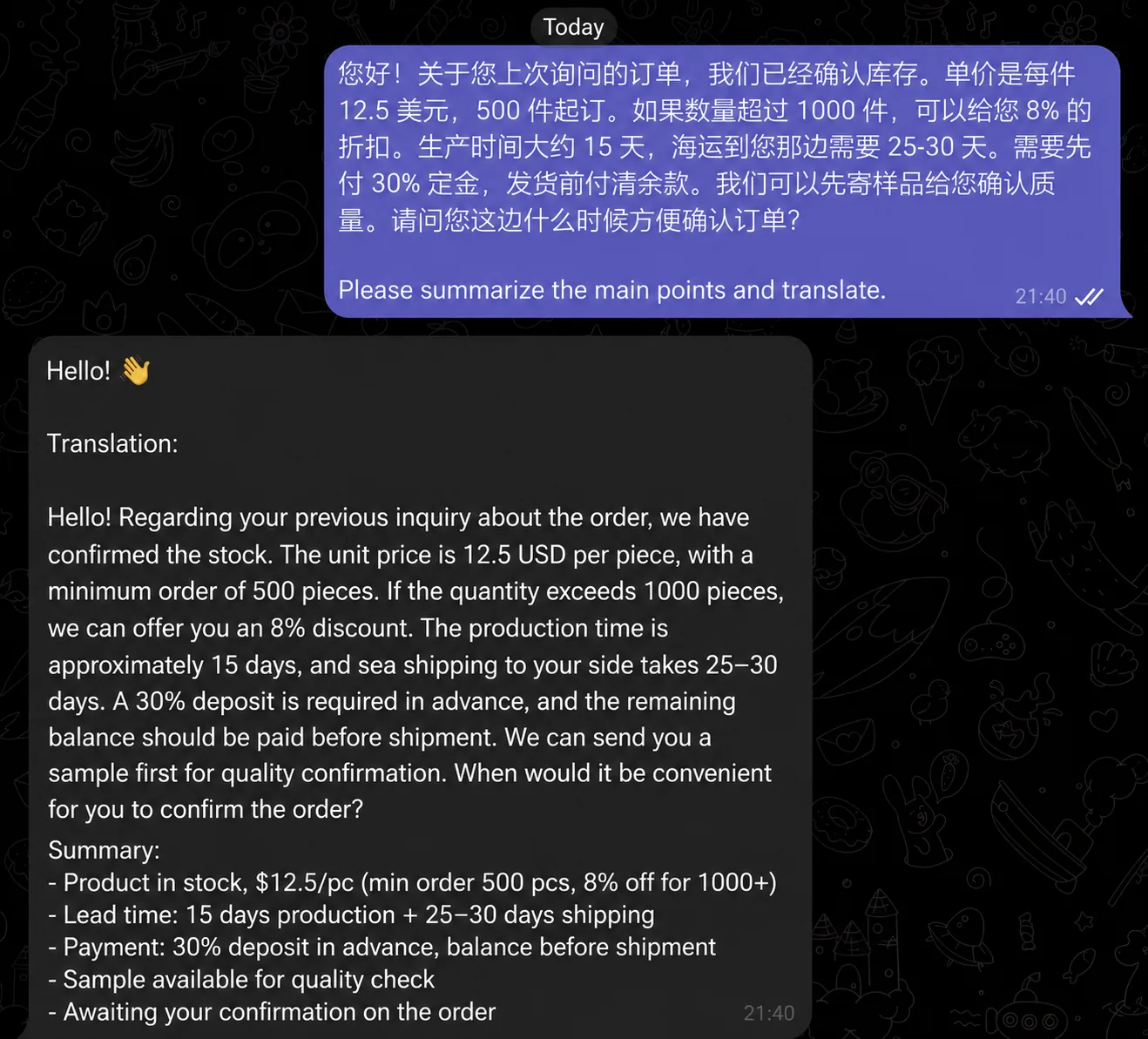
The language is detected automatically. English, Spanish, Chinese, German, and so on: you don't need to say which language you're translating from. You only point to the language you want the result in.
How to translate your reply and send it back
Translation works both ways, and that closes the second half of the problem. You don't only need to understand the other person, you need to answer them.
Type or dictate your thought in your own language and ask, in the next message or at the end of the text: "translate to English". The assistant hands back a ready text you can copy and send to your partner or friend. You get a full two-way conversation, and both halves of it sit in one place: Telegram.
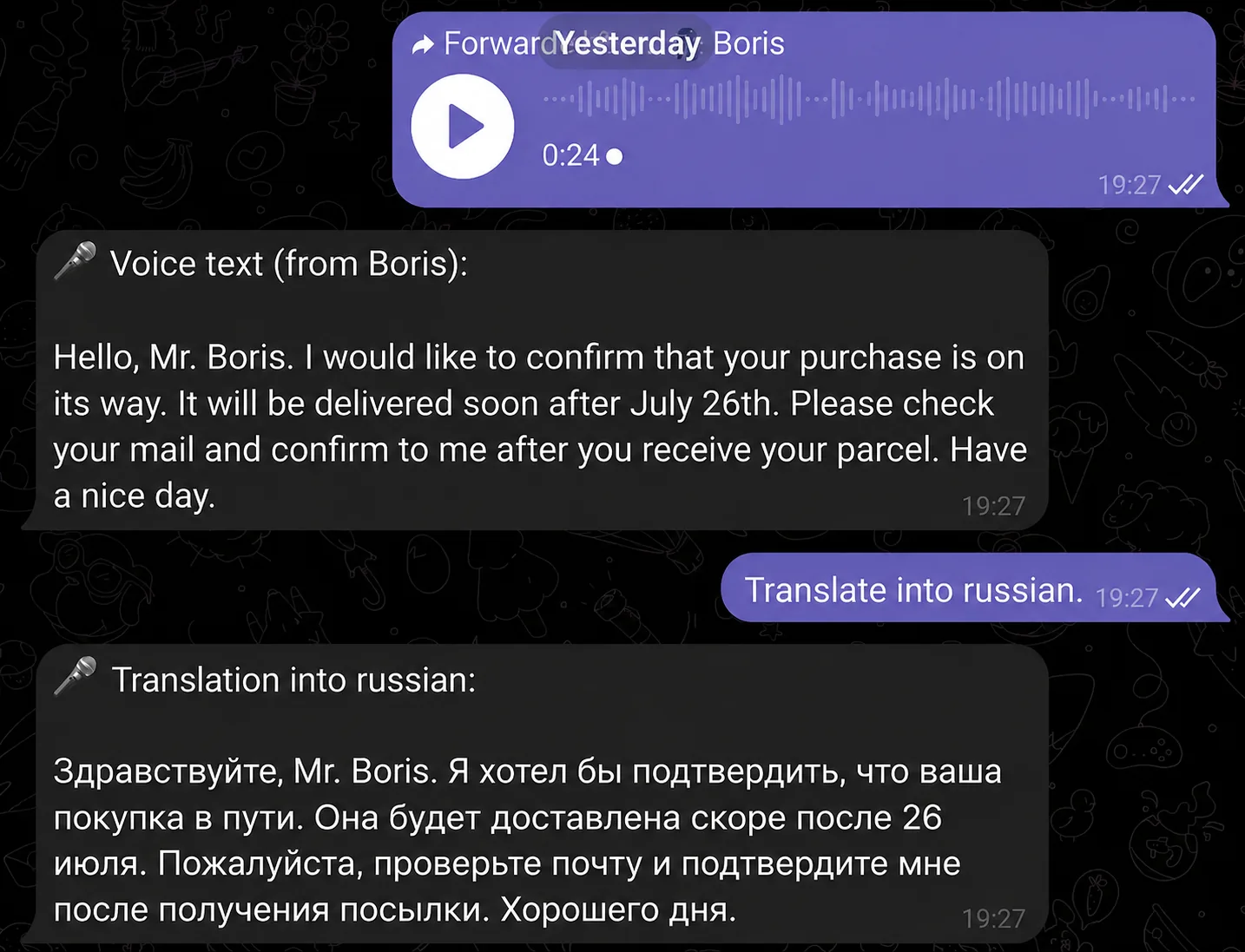
Voice notes aren't a problem either. If someone sends you audio in a foreign language, forward it to the assistant, it recognizes the speech and shows the transcript as text, and then you ask it to translate. It works the other way around too: dictate a message in your own language, ask for a translation into the language you need, and send the ready text to the other person. We covered how to turn a voice message into text in a separate article.
Translation is the start, not the end
The real difference from an ordinary translator app or service is that the translated text stays in the context of the conversation. It isn't a one-off operation you forget right after, it's part of an ongoing chat and your work.
You forwarded a long exchange with a client, translated it, and right away you can ask for more:
"sum up what we agreed on" — if the discussion dragged on
"list what I need to do" — if there were tasks buried in it
"set a reminder about the call on Friday" — if you agreed on something
"draft a reply saying I accept the terms" — and translate it straight back
The context sticks, so you can ask follow-ups and clarify. You translated a message from a foreign client, asked it to pull out the main points, and then the assistant, working from the same thread, sets a reminder or drafts an email. There are plenty of scenarios like this, all in one unbroken conversation.
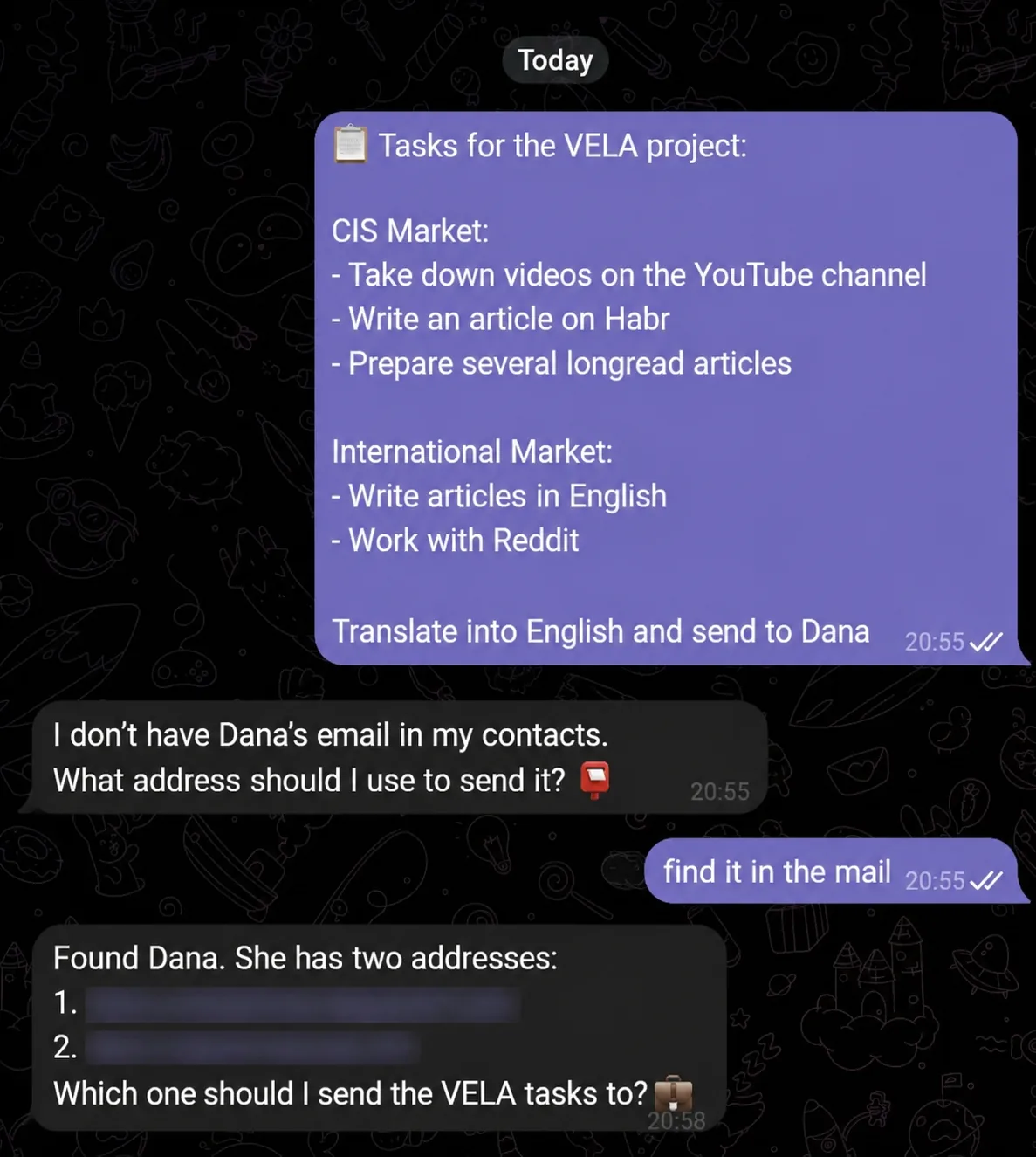
If you're on the Pro plan with Gmail connected, translation folds into your email work in Gmail too: a letter comes in a foreign language, you translate it with the assistant, draft a reply right there, and send it from the chat with a command. Translation stops being a separate step or a jump to another app and becomes part of working with text inside your messenger.
An honest word on what to expect
VELA isn't a replacement for Google Translate, DeepL, and the rest when it comes to language coverage, and it isn't a professional translation tool. Translation here is a capability of the Claude model under the hood, not a dedicated engine with hundreds of languages (including rare and archaic ones) and full dictionaries.
For chats, work messages, and everyday communication, that's more than enough. If you need a precise technical or legal translation of a document, specialized services will do it better, and they're more convenient for that kind of task. The strength here is different: the translation lives where your conversation happens, and your workflow never breaks.
Translation works on both plans: Basic (the free plan) and Pro. On Basic you get 15 messages a day for the first two weeks, after that 5 a day, and each voice note or translation request counts as one message. If you translate a lot and often, it's worth looking at Pro: there's no daily message limit there. The ability to translate, transcribe voice notes, and keep working with the text is the same on both plans (apart from a few modules that aren't available on the free plan).
FAQ
Do I need to say which language to translate from? No. The assistant detects the source language on its own. Just say which language you want the result in, for example "translate to English".
Can I translate a voice message? Yes. Forward the voice note to the chat with the assistant, it recognizes the speech and the language, shows the text, and then translates it on request.
How is this different from Google Translate and similar services? Google Translate is a separate app, you copy text there and back. With VELA's AI assistant the translation happens right in Telegram, where the work and the conversation already live, and the translated text stays in the context of the chat: you can summarize it, pull out tasks, set a reminder, or send a reply on the spot.
Which plans is translation available on? Both, Basic and Pro. The only difference is the number of messages a day: 15 on Basic for the first two weeks, after that 5 a day, no daily limit on Pro.