
You're chatting with a friend, and suddenly you need to quickly check something with the AI assistant. You have to open the chat with it, switch out of the current dialog, get the information, and go back. A small ritual, but it distracts you and breaks the rhythm of the whole conversation. Inline mode in Telegram solves exactly this problem: you type @assistant_name right in the input field of the current chat, ask a question, and the answer appears right there, as a pop-up card.
This is a built-in Telegram feature that VELA's AI assistant supports. Nothing revolutionary: it just pairs Telegram's own feature with your assistant.
How to enable inline mode
By default inline mode is off: you need to activate it once in @BotFather.
Open Telegram, find @BotFather and write /setinline. BotFather will ask which bot to configure, choose yours, the one connected to the VELA platform. Then it'll ask you to set a placeholder (a hint text in the input field). You can write anything: "Ask me something" or just "Ask a question...". After that inline mode is active.

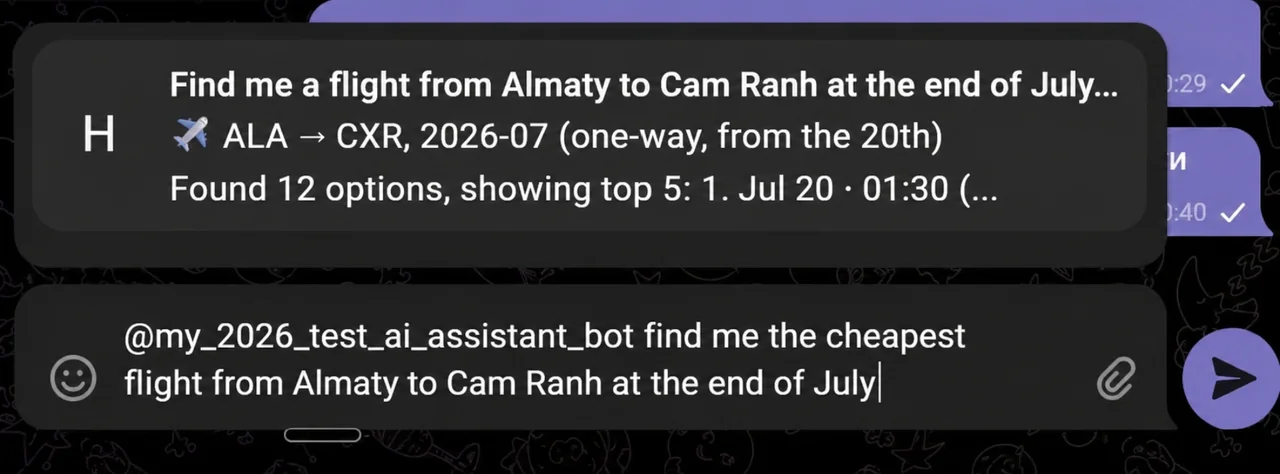
Now in any Telegram chat — personal, group, any dialog, it's enough to write @assistant_name, put a space and ask your question. Within a second a pop-up window with the answer appears above the input field. You tap it: the message is sent to the chat with the note "via @assistant_name".
How it looks in practice
Marina is chatting with a colleague about a report. The colleague mentioned "EBITDA". Marina doesn't remember the exact definition. Instead of googling or switching to the private chat with the AI assistant, she writes right in the same chat: @assistant_name what is EBITDA in simple terms. Within a second a card with a short answer appears. She tapped it. The answer was inserted into the chat. The dialog wasn't interrupted.
Anton in a work group with the team is discussing a text translation. Someone drops a paragraph in English, Anton writes @assistant_name translate to Russian: [text]. The translation appears in the chat right away, everyone sees it.

What's important to understand about the limitations
Inline mode is a tool for quick, short questions. Not for a deep conversation.
The answer is short. The AI assistant replies with just the gist, no extra detail. If you need a full analysis or a long answer, message it in the private chat instead.
No dialog history. Each inline request is a separate question without the context of previous ones. The AI assistant doesn't remember what you asked five minutes ago in the same mode. The context exists only in the private conversation with it.
Modules work by plan. Weather, rates, flight search, internet search, the guide — all of this is available in inline mode according to your plan. Only what requires a personal account or a separate connection isn't available: the Google Workspace, Notion and Reading Telegram channels integrations, plus image & video generation and the morning digest. For those you need to write to the private chat directly.
Everyone sees the answer. When you insert an answer into the chat via inline mode, it's displayed as a regular message with the note "via @assistant_name". This is a public action — all chat participants see both the answer and the fact that it's from your AI assistant.
Inline mode and direct work in a group are incompatible. If you've enabled inline mode via /setinline in @BotFather, the AI assistant won't respond to mentions in the group directly. Telegram intercepts them and opens an inline card instead of delivering them to it as a message. Choose one: either inline mode, or the AI assistant's regular work in the group.
To work in groups you need to turn off Group Privacy. By default Telegram doesn't deliver group messages to the AI assistant — only commands and replies to its messages. So that the AI assistant receives mentions in the group, open @BotFather: /mybots → your bot → Bot Settings → Group Privacy → Disable (OFF). After that, kick the AI assistant from the group and add it back.
Basic or Pro — is there a difference
For inline mode itself there's no difference: on both plans it works on the Claude Haiku model, a fast one that handles short questions, translations and definitions well. Those are exactly the tasks inline solves.
The difference between the plans is in the available modules: on Pro, flight search and advanced cryptocurrency search also work in inline. And Claude Sonnet on Pro kicks in in the private chat with the AI assistant: where accuracy and depth matter: complex wording, multi-step tasks, working with documents.
When inline is convenient, and when it's better to write to the private chat
Inline mode is good when:
you need a quick answer right in the context of the conversation
you want to insert a translation or explanation into the chat without forwarding
the question is simple and the answer fits in three sentences
A private chat with the AI assistant is better when:
you need a detailed answer or analysis
the context of previous messages matters
you want to use internet search, reminders or other modules
the answer is confidential and shouldn't end up in the group chat
The two modes complement each other. Inline — for quick public questions right in the conversation. The private chat, for everything else.
FAQ
Is a separate setup in VELA needed for inline mode? No. The only thing needed is to enable inline mode once in @BotFather with the /setinline command. In the VELA dashboard nothing additional needs to be configured.
Can other chat participants use my bot via inline mode? No. When someone else writes @assistant_name in the input field — it doesn't answer them. An inline request only works for its owner. This is protection against accidental use of your AI assistant by outsiders.
Does inline mode work in groups? The inline interface — yes: the card appears in the group, you tap it — the answer is inserted into the chat. But if inline mode is on, the AI assistant doesn't respond to mentions directly. Telegram intercepts them and opens an inline card instead of delivering them to it as a message. Inline mode and direct communication with the AI assistant in a group are impossible at the same time. If you need regular work in a group — don't enable /setinline in @BotFather.