
There are more AI tools in 2026 than ever. ChatGPT, Claude, Gemini, Grok and others — these are language models (LLMs); they can talk and generate text. On top of them, dozens of platforms are built that turn these models into real AI assistants — with integrations, memory and actual actions. Choosing among all this is genuinely hard, because it's not even obvious what to compare in the first place.
This article isn't a ranking or an ad. It's a list of questions worth asking yourself before paying for a subscription to any paid tool. Let's go through it on the merits.
Where the AI assistant lives — more important than it seems
The first question that usually gets ignored: in which interface are you going to use the AI assistant?
AI assistants live in different places: in the browser, in a separate app, in a messenger. Each one means a separate window, a separate tab, a separate switch. Open it, sign in, ask, go back. A small thing, but over time that friction is exactly what makes people drop the tool and go back to doing everything by hand.
Practice shows: AI assistants work best where you already spend your time. For most people that's a messenger. Telegram is open all the time, so an AI assistant there means no switching between tabs and apps. Ask on the go, get an answer, carry on with what you were doing.
The VELA platform is built on this principle: you create a personal Telegram bot and chat with it just like with any of your contacts. No separate app, no new browser tabs.
What the AI assistant can do — and whether it can do it specifically for you
Marketing pages write "it can do everything." In practice, what matters is different: can the AI assistant do exactly what you need every day.
Before choosing, make a short list of your real routine tasks. Here's a typical set:
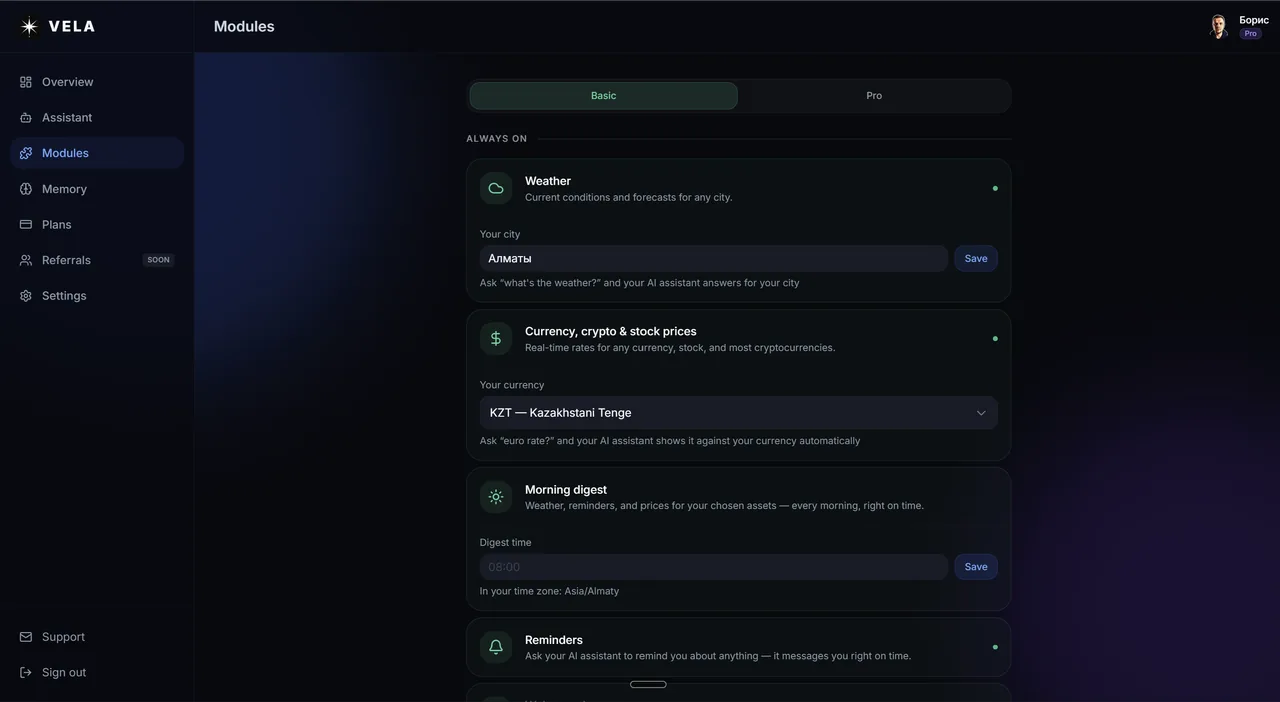
Weather before leaving home or before a trip or journey
A currency rate before exchanging
A reminder about tasks, events, errands
Quick info search without a browser and search engines
Working with email and calendar
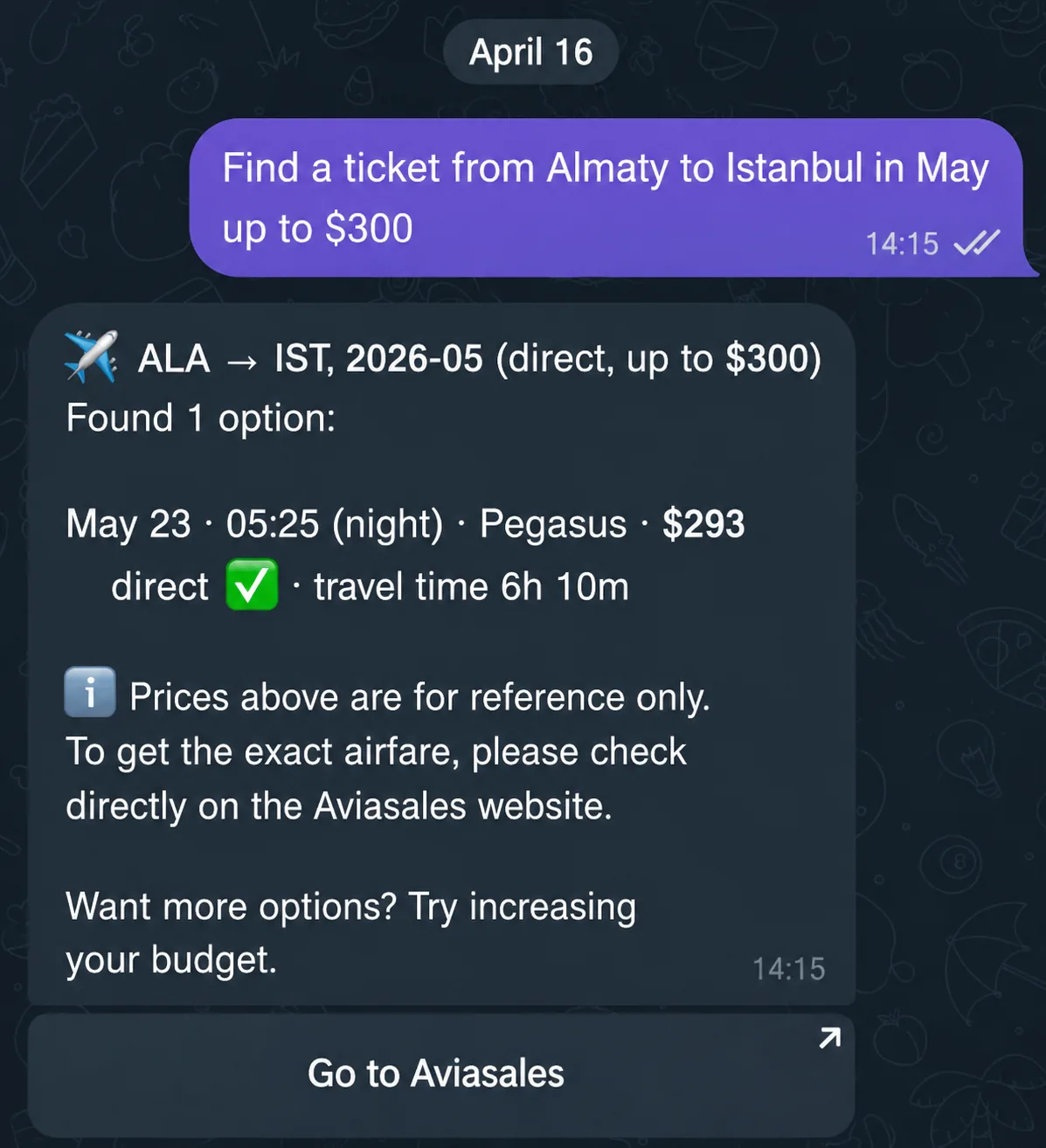
Flight search
If the AI assistant covers 5 of 6 — it already pays back the time invested in learning and setting it up. But if it only "can answer questions" — that's just a chat with a language model, not an AI assistant.
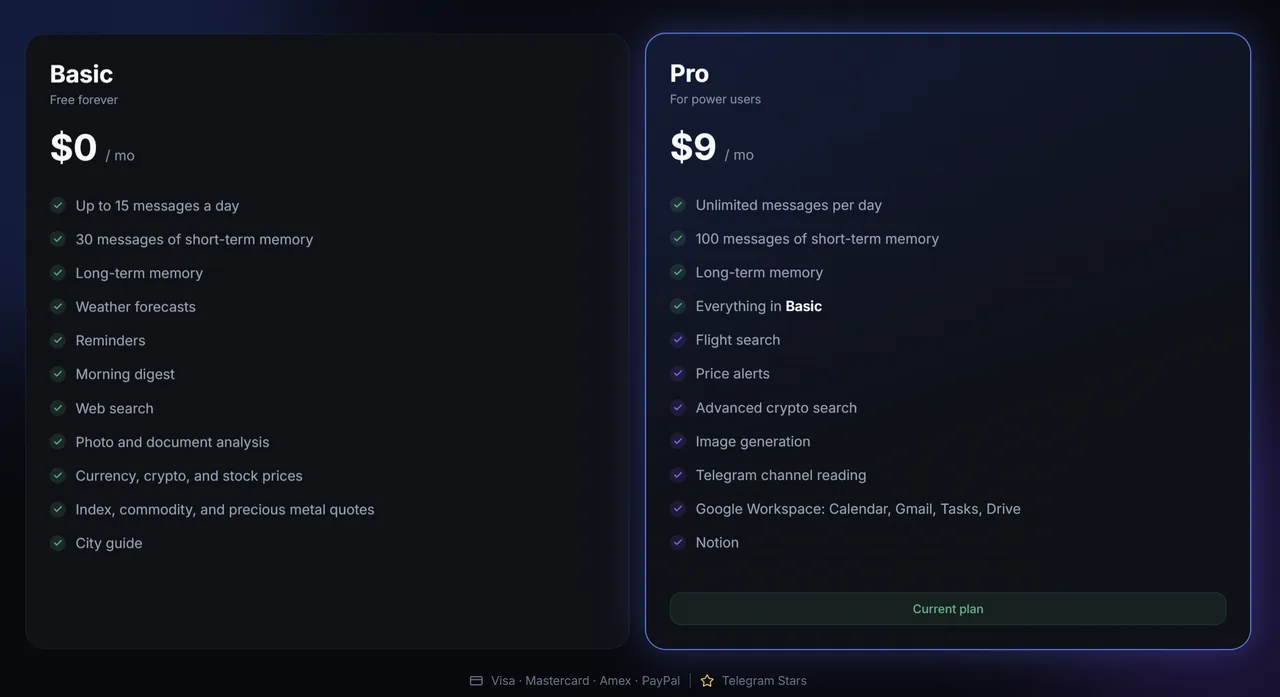
For example, a smart AI assistant on the VELA platform with the free Basic plan covers weather, currency, crypto, stock, index and precious-metal rates, reminders, internet search, photo and document analysis, the morning digest, the guide (finding places and venues) and long-term memory — without a card, without hidden future charges.
On Pro for $9 a month it adds flight search for any route with filters by price, dates and airlines, price alerts on any asset, advanced cryptocurrency search (rare tokens), all of Google Workspace — Calendar, Mail, Tasks, Drive — plus Notion integration, image generation from a description in the chat, and reading Telegram channels through your personal account.
Does the AI assistant understand natural language
This isn't a rhetorical question. Some AI assistants still require exact commands: /weather Moscow, /remind 18:00. If you make a mistake — the task won't work.
Others understand live speech. You wrote "remind me in half an hour about taking my medicine" — the AI assistant understood the task. You said by voice "what's the weather this weekend in Berlin" — it understood too. The difference in experience is huge: the first option requires remembering command syntax, the second works like a normal conversation.
A hard criterion when choosing an AI assistant: try writing it an imprecise request with a typo or in a conversational style. If it clarifies and answers — good. If it requires rephrasing — that's a signal.
The AI assistant on VELA works through Claude from Anthropic — one of the strongest language models today for understanding context. Voice messages work too: the AI assistant recognizes the audio message and performs the task in it just as if it had been typed as text.
A separate point — the language of the answers. On VELA it's determined automatically by the language of your message: you write in Russian — the AI assistant answers in Russian, in English — in English, and so on in any language in the world. If you want to fix the language firmly — set it manually in the dashboard on the "Assistant" page: Russian, English or Auto (the default).
Does the AI assistant remember who you are
Most free solutions on the market — without built-in memory. Each session starts over. You explain to the AI assistant again and again: "I live in Moscow, I work remotely, my name is Konstantin," and so on.
Memory between sessions isn't a luxury, it's a basic comfort for work and communication. A good AI assistant remembers your city, name, preferences, work context — and uses it without you reminding it every time in a new session. You asked for the weather in the morning — it's already given in the chat with your city in mind.
On both plans of the VELA platform long-term memory is enabled: the AI assistant saves facts about you between sessions automatically. You can see in the bot menu exactly what's saved ("what does the AI assistant know about me") and also erase any fact from its memory about you.

What about security and data access
If the AI assistant works with email and calendar — it asks for access to your Google account. This is standard practice: you don't hand over your password, you only allow access to specific services.
Important: whether the platform stores the contents of your emails or only receives data at the moment of the request. The AI assistant on VELA works by the second principle.
How not to overpay at the start
A simple rule: start with the free plan. If the AI assistant really embeds into your routine during the first week of testing — the subsequent paid plan pays for itself. And if not — no big deal, you haven't lost anything.
The VELA platform offers a free and permanent plan: 15 messages a day with the AI assistant, 9 useful modules out of the box, quick registration and setup in 5 minutes. This is an honest way to test the AI assistant in action before the first payment.
Bottom line: three questions before choosing
In short — there are three main questions that cut off most unsuitable options:
Where does it work? An AI assistant is useful only if it's in the app you already open every day.
Can it do what you need? Check against the list of its features on the site.
Does it remember who you are? Without memory between conversation sessions — it's not an AI assistant, just a search engine with a pretty interface.
Everything else is details. But it's the details that decide whether you'll open it tomorrow morning or forget about its existence in a few days.
FAQ
Do I need technical knowledge to set up such an AI assistant? No. Registration and bot setup on the VELA platform takes on average no more than 5 minutes: you just need to get a new bot's token yourself through @BotFather in Telegram, paste it during registration, and your new smart AI assistant is ready to work. No need to write code, configure a server or other technical nuances.
How is an AI assistant in Telegram different from ChatGPT or Claude directly? ChatGPT and Claude are powerful products in their own right, used in their own app or browser. VELA's difference is where it lives and what it connects: it's Claude inside Telegram, tied to reminders, flight search, your Gmail and calendar, and a morning digest that arrives on its own — a personal assistant in the messenger you already use, not another window to open.
Is it safe to connect your Google account to the AI assistant? Yes. Access to Google works through Google's own standard procedure — you don't hand over your password, you only allow access to specific services. VELA doesn't store or read the contents of emails — data is requested in real time when the module is used and goes nowhere further.
Can I use the AI assistant for free? Yes. On VELA's Basic — a lot is available out of the box. A card isn't required at registration. Switching to a paid plan is possible later — only if you actively use the AI assistant and hit the limits or want to expand its functionality.