
Checking the price of a little-known crypto token or memecoin is a task that usually requires an app or a site: CoinGecko, DEX Screener, GMGN, CoinMarketCap and others. You have to enter a ticker, sift through similar tokens, sometimes search by contract address. When a token is rare and not on Binance, Bybit and other major exchanges, the search eats up time. The "Advanced cryptocurrency search" module in VELA's AI assistant closes this routine right in Telegram — you write the token name or paste the contract address, and get the price and 24-hour change.
What the module does and which plan it's on
The module is available on the Pro plan ($9/mo, paid by card or Telegram Stars). The free Basic plan already has the basic "Currency, crypto and stock rates" module — it covers top tokens from a fixed list: BTC, ETH, SOL, BNB, XRP, DOGE, ADA, AVAX, TON and other liquid assets. The advanced search adds everything beyond that list.
What the advanced cryptocurrency search does:
The price of any token — including rare, little-known, and recently launched ones
Search by name or ticker — the AI assistant finds the token and returns the price
Search by contract address — Ethereum (0x...) and Solana
Returns the ticker, price, and 24-hour change
The module is active on the Pro plan right away — no extra settings in the dashboard are needed.

How to set it up
You don't need to set the module up. After switching to the Pro plan, advanced cryptocurrency search works automatically. Write the token name or paste the contract address in the chat with the AI assistant, and get the price, ticker, and 24-hour change.
How to use it: example requests
The AI assistant understands natural language. Write the token's name or ticker — the AI assistant will find it in the database and return the price.
By name or ticker:
"Iryna rate"
"How much is LOL"
"The price of the Rome token"
"BOSS now"
By contract address:
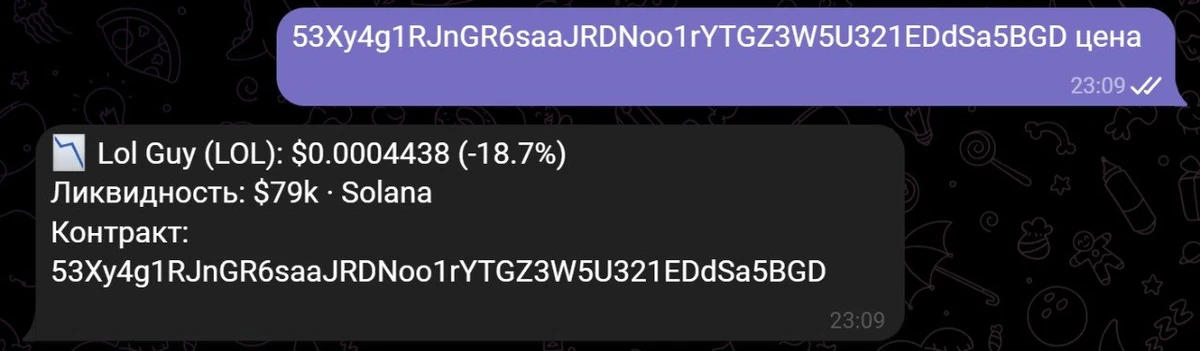
- "0x6982508145454ce325ddbe47a25d4ec3d2311933" — the AI assistant recognizes that this is a contract address and returns the token's price
If several tokens with the same name are found, the AI assistant shows a list with prices and liquidity and asks you to clarify. Reply with a number from the list or specify the network in the request: "Rome solana" or "Rome ethereum". If the token is brand new and there's no data, the AI assistant will say it didn't find it: try a different spelling or paste the contract address.
By voice
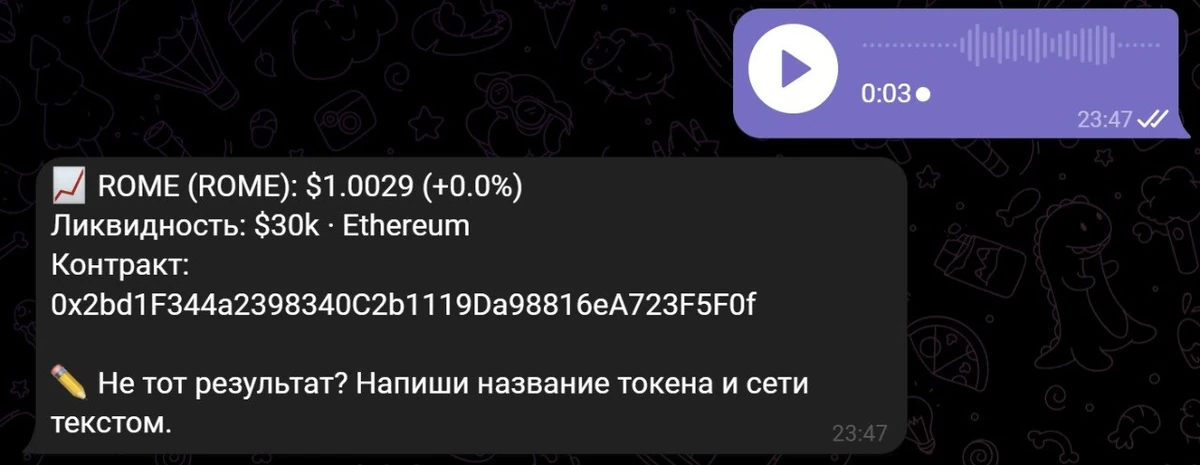
You don't have to type. The AI assistant recognizes voice messages and handles them just like text.
Dictate: "how much is pippin" or "the price of the stupid token" — the reply comes back as text. Handy when typing is awkward — in transit, on the move, behind the wheel.
Long contract addresses can't be conveyed by voice — those are better pasted as text. But for requests by name and ticker, voice works great.
What the module can't do
Clear boundaries — so there are no surprises:
Doesn't build charts or do technical analysis. Only the current price and the 24-hour change. If you need candles, RSI, trading volumes — that's TradingView, DEX Screener or other services.
Doesn't buy or sell. The AI assistant only shows the price and basic data.
Doesn't monitor the price in the background. It shows the price on request. If you need an alert when a token reaches a level you want, that's the "Price Alerts" module, also available on the Pro plan.
Doesn't show historical data. Yesterday's price, the weekly low, the price a month ago — none of that.
Doesn't work with tokens without public data. If a token trades only on a closed exchange or isn't in the available sources, the AI assistant won't return a result.
One chat instead of several tabs
When you need to find the price of a top token, opening Binance, Bybit or CoinMarketCap is a habit. When you need to find out the price of a rare one, the filtering begins: DEX Screener, GeckoTerminal, GMGN, pasting an address or ticker, waiting for it to load, picking the right one rather than a copy.
With VELA's AI assistant it's one request in Telegram. Name, ticker or contract address — all in one chat, next to reminders, the "Flight search" module, the morning digest and much more. No need to switch between apps and services.
FAQ
Is advanced cryptocurrency search included in Basic? No. The basic "Currency, crypto and stock rates" module on Basic covers only top tokens from a fixed list: BTC, ETH, SOL, BNB, XRP, DOGE, ADA, AVAX, TON and other major crypto assets. Rare tokens, memecoins outside the top, and contract addresses — only on the Pro plan ($9/mo, paid by card or Telegram Stars).
How do I find a token by name? Just write the token's name or ticker in the chat with the AI assistant. If several options are found, the AI assistant will show a list and ask you to clarify.
How do I find a token by contract address? Paste the contract address in the chat — the AI assistant will recognize that it's an address and return the result.
Can I get an alert when a rare token reaches a price I want? Yes. The "Price Alerts" module on the Pro plan supports contract addresses. More in the article on price alerts.
Do I need to configure anything for the advanced search? No. After switching to Pro the module works automatically — just write a request to the AI assistant in the chat.
What if the AI assistant found the wrong token? Write the name and network in one message — for example "Rome solana" or "Rome ethereum". Supported are Solana, Ethereum, BSC, Base, Arbitrum, Tron, Polygon.
What if the token is very new and not in the database? The AI assistant will say the token wasn't found. Try clarifying the spelling or write the name and network — for example "Rome solana".